| Contacting Attendees by Email | <– Date –> <– Thread –> |
From: Jay Sage, 2022 Conference Webmaster (webmaster iajgs2022.org) iajgs2022.org)
|
|
| Date: Fri, 19 Aug 2022 11:33:08 -0700 (PDT) | |
Several people have been asking about contacting another attendee by email (for example, to discuss a mentoring or translation appointment). Here's how to do it.
Log into the Attendee Service Center (if you are not already logged in). Then, under the ATTENDEE tab, click on the "Appointment Scheduler" item.
Now enter the last name of the attendee you wish to contact. For
example, here is a search for conference chair Judi Missel. (You
can also use this screen to search based on information other than
last name. The search can be limited to mentors or translators,
the translation language, etc.)
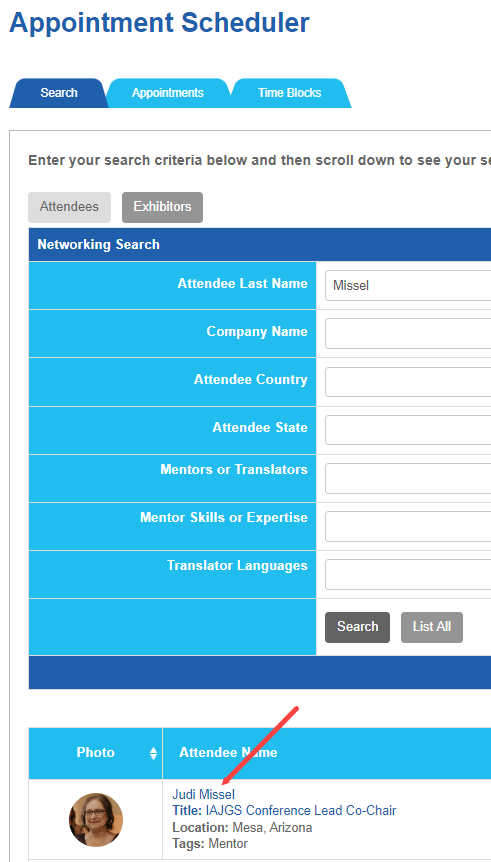
Note that the person's name in the search results is a link (the red arrow above). Click on that link. A new window will open with information about the person and a link for contacting them by email.
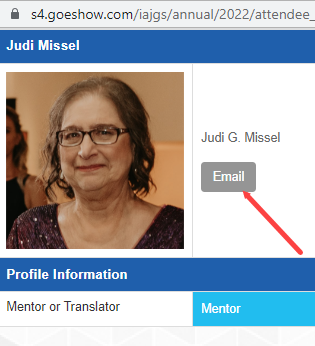
When you click on that "Email" link, a third window will open in which you can send an email message to that person through the conference software.
-- Jay
Jay Sage
Webmaster, IAJGS 2022 Virtual Conference
webmaster [at] iajgs2022.org
- (no other messages in thread)
Results generated by Tiger Technologies Web hosting using MHonArc.